All guides
GuidesYour books
The Home screen
What each card on Home shows, where the figure comes from in Tally, and what the map of where you sell is built from.
4 minute read
What Home is for
Home answers the questions you would otherwise open several Tally reports for: how much have we sold, who owes us, what do we owe, how much is in the bank, and is anything waiting for me.
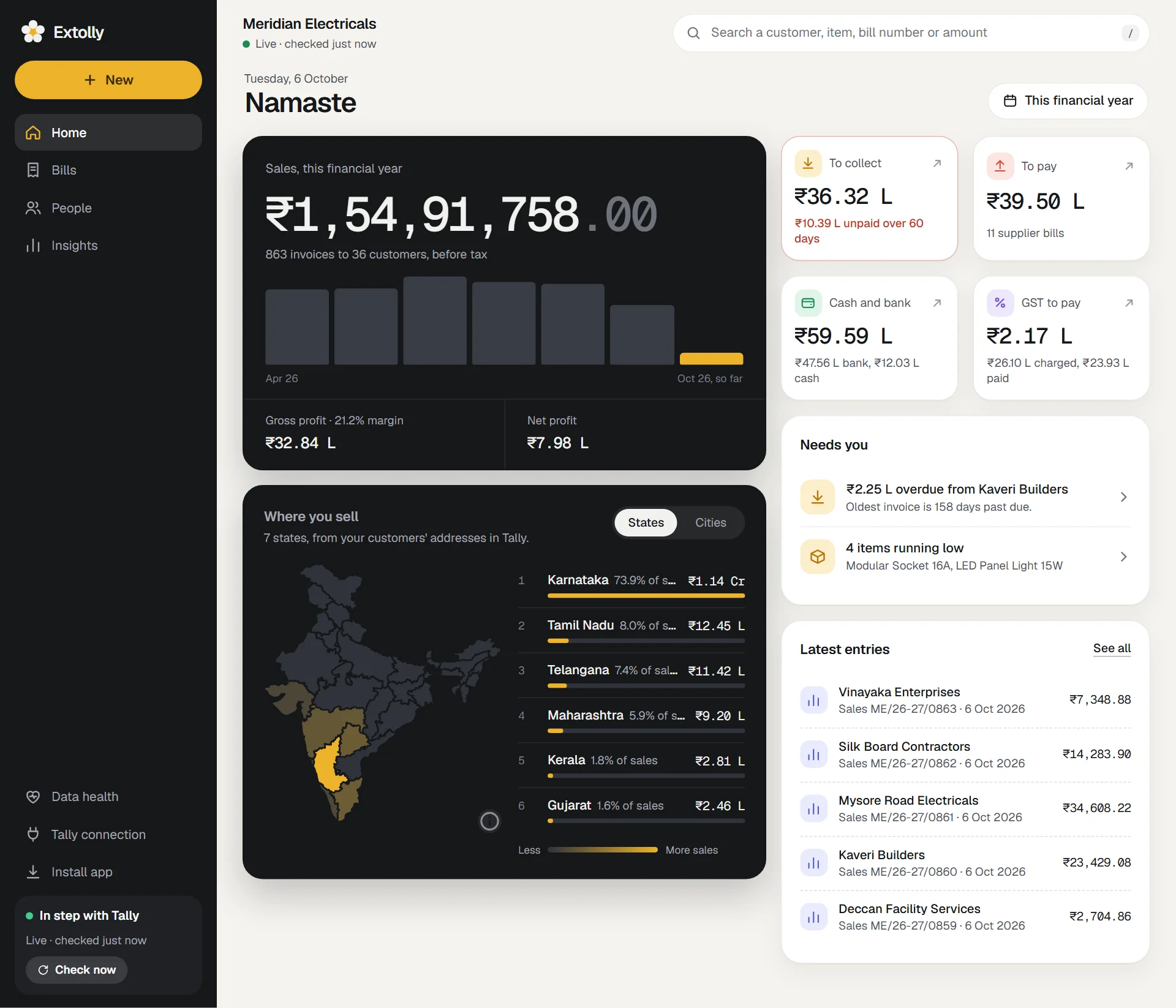
At the top is today's date, a greeting, and the period picker. The period changes the sales card, the map and the GST tile. The other three tiles are always as of today.
The sales card
The dark card at the top left.
- The figure is net sales for the period: before tax, after returns.
- Under it: how many invoices went to how many customers.
- The bars show sales through the period, one bar a day, week, month or year depending on how long the period is. The bar still running is highlighted. Point at a bar for its date, sales and number of invoices.
- A small tag beside the label shows the change against the period of the same length just before, when that earlier period falls inside your books.
- Gross profit with its margin, and Net profit. Press either to open the Sales screen.
The four tiles
| Tile | Shows | Under it | Opens |
|---|---|---|---|
| To collect | What customers owe you today | The amount unpaid for over 60 days, or the number of unpaid invoices | Customers |
| To pay | What you owe suppliers today | The number of supplier bills | Suppliers |
| Cash and bank | Cash plus bank balances today | How much is in the bank and how much is cash | Money |
| GST to pay or GST credit | Tax charged on sales less tax paid on purchases, for the period | The two amounts | GST |
A tile changes to a warning colour when it deserves a second look: To collect when some of it is over 60 days old, To pay when it is more than your cash and bank together.
Where you sell
A map of India shaded by sales, with a list beside it. Switch between States and Cities.
- Press a state on the map, or a row in the list, to highlight it. Point at a state for its sales, its share and the number of customers.
- The list shows the top six, each with its share of sales.
The map is built from the state and city on each customer's ledger in Tally. The city is taken from the last line of the address.
Cash sales have no customer, so they are left off the map.
Needs you
This card appears only when something is waiting for you. It can list:
- Bills refused by Tally, bills to check in Tally, bills waiting for Tally, and drafts not sent yet. See When a bill is waiting or refused.
- The largest overdue amount, with the customer's name and how many days past due the oldest invoice is.
- Items out of stock, or running low.
- Gaps in your Tally data that leave reports incomplete. See Data health.
Press a line to go straight to it.
Latest entries
The five newest entries in your books, whoever entered them and wherever: in Tally or in Extolly. Press one to open it, or See all for Bills.
When the period is empty
If nothing was sold in the dates you chose, the sales card and the map give way to a short note saying when the latest sale was, with buttons for periods that do contain it.
Can I rearrange Home?
No. Home is the same for everyone. The Sales, Money and Stock screens can be rearranged: see Sales, Money and Stock.
Still stuck? Write to support@extolly.com and say which step you are on.